PAA Audio
American FET
FET compressor / limiter · circuit-modelled 500-series dynamics
User Manual · Version 1.0 · macOS: VST3, AU, AAX · Windows & Linux: VST3
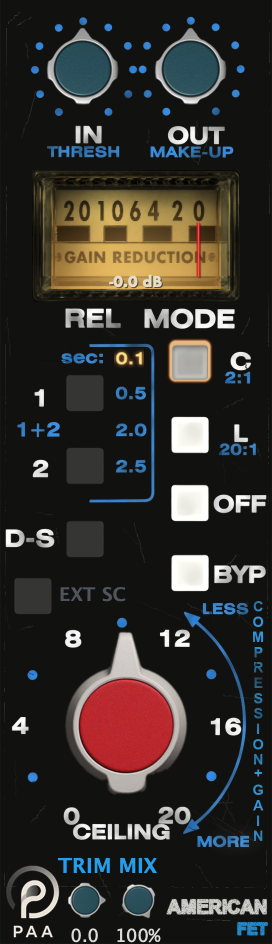
FET compressor / limiter · circuit-modelled 500-series dynamics
User Manual · Version 1.0 · macOS: VST3, AU, AAX · Windows & Linux: VST3
American FET is a circuit-level model of a classic American FET compressor from the 500-series rack. Every stage is solved as a real circuit per sample: the two discrete op-amps, the FET gain cell, the detector network and the output transformer. Attack, knee and saturation therefore follow level the way the hardware does, instead of following a curve someone drew.
Run PAA-Audio-American-FET.pkg. It is signed and notarized by Apple, so it installs
without a Gatekeeper warning. Pick the formats you need in the installer.
/Library/Audio/Plug-Ins/VST3/Library/Audio/Plug-Ins/Components/Library/Application Support/Avid/Audio/Plug-InsThe AAX build is PACE-signed and comes with the same package, so there is no separate download. After installing, rescan plug-ins in your DAW. Logic validates the AU automatically on next launch.
Run PAA-Audio-American-FET_1.1.0_win.exe. If Windows SmartScreen appears, click
More info → Run anyway, then restart your DAW.
C:\Program Files\Common Files\VST3
Unpack PAA-Audio-American-FET_1.1.0_linux.tar.gz and move the bundle into your VST3
folder, then restart your DAW.
~/.vst3 (only you) or /usr/lib/vst3 (all users)The Linux build is VST3 only and is built against Ubuntu 22.04, so it needs glibc 2.35 or newer.
System: macOS 11.0+ (Apple Silicon / Intel), Windows 10+ (64-bit) or Linux (glibc 2.35+, VST3 only). A stereo instance costs about 3 % of one core at 48 kHz under heavy gain reduction, a mono instance half that. Above +6 dB of OUT the plug-in switches to an eight-times oversampled output stage, which raises a stereo instance to roughly 8 % of one core (see section 8). The plug-in reports 98 samples of latency (94 from the oversampled output stage, 4 from the detector's band-limited peak reconstruction), which your host compensates automatically.
After purchase you receive a licence file named license.lic by email. To activate,
right-click anywhere on the plugin panel, choose Activate License… and select that file.
Activation is offline and permanent. No account, no internet connection, no dongle.
The licence is tied to your name and e-mail, not to a machine, so install it on every computer you
work on, in every format. Keep the original .lic file safe; you can also re-download
it any time from your account at paa-audio.de.
Without a licence the plug-in runs in Demo Mode: fully functional, nothing time-limited and no controls disabled, but a short noise burst is inserted every minute and a half.
The panel follows the hardware it models, so anyone who has used the original will feel at home. From top to bottom:
| Control | Range | Function |
|---|---|---|
| IN | 0 … 10 | Default 0 (sidechain off). Threshold, 3 dB per step from 1 to 10 (5 = −15 dBFS with CEILING 0, 8 = factory calibration point, 10 = 6 dB below it); below 1 the scale runs out logarithmically, 0 = sidechain off, no compression |
| OUT | −12 … +12 dB | Make-up gain, sits between the two op-amps and drives the output stage |
| CEILING | 0 … 20 | Default 0. Main control: 2 dB per step, as on the hardware ladder — lowers the threshold and raises make-up together (constant output at the calibration level) |
| TRIM | −24 … +6 dB | Clean level trim after the transformer |
| MIX | 0 … 100 % | Dry/wet blend for parallel compression |
| REL | 4 positions | 0.1 / 0.5 / 2.0 / 2.5 s release |
| MODE | C · L · OFF · BYP | Compress 2:1 · Limit 20:1 · gain reduction off · full bypass |
| D-S | on / off | Frequency-selective detector (de-esser) |
| EXT SC | on / off | External sidechain / key input |
| VU | · | Gain reduction in dB. The needle uses the original scale and stops at 20 dB |
| Peak readout | · | The number under the meter holds the deepest gain reduction of the last two seconds, then follows the current value again. It is not limited to the meter scale, so it shows the full amount even when the needle is against the end stop |
The peak readout is a plug-in addition, not a hardware feature. It fades in when compression starts and fades out again when there is none, so it stays out of the way while you work.
CEILING is the control you will reach for first. On the hardware it lowers the threshold and raises make-up gain at the same time, so the output level stays roughly constant while the compression deepens. Turning it up towards MORE gives you more gain reduction without the track getting quieter.
IN (THRESH) sets the threshold on a straight dB scale, 3 dB per step, from IN 1 (−3 dBFS with CEILING 0) to IN 10; IN 5 puts it at −15 dBFS, IN 8 is the factory calibration point of the hardware test procedure (0 dBM = −24 dBFS), IN 10 goes 6 dB below that. Below IN 1 the scale runs out like the end of an audio-taper pot and at IN 0 the sidechain is closed — no compression at all, as on the hardware with the IN control fully counter-clockwise. The hardware feeds this pot from the amplifier output into the detector; the plug-in maps it to dB so that the whole DAW level range is usable across the dial.
At the calibration point (IN 8, 0 dBM = −24 dBFS input) the output stays at 0 dBM across the whole CEILING range while the gain reduction grows 2 dB per step, up to 20 dB at CEILING 20. Above that level the ratio steepens the way the factory test table documents it: at CEILING 20 the unit runs roughly 5:1 up to the calibration level and 10:1 above it (+10 dB in → +1 dB out in C, 0 dB out in L). For gentle 2:1 work use low CEILING settings (2–6) and set the operating level with IN.
| Mode | Behaviour |
|---|---|
| C · 2:1 | Compression. Gentle ratio, programme-dependent knee. The everyday setting. |
| L · 20:1 | Limiting. Hard control of peaks, noticeably more assertive. |
| OFF | Gain reduction disabled, but the signal still passes through the amplifier stages and output transformer, so you keep the colour without the dynamics. |
| BYP | Full bypass. The dry signal is passed through untouched. |
OFF is not a bypass: the amplifier stages and the transformer stay in circuit, only the gain reduction is disabled. Useful when a track needs the weight of the unit but is already compressed somewhere else.
It also turns the unit into a colour box. With the gain cell out of the way, OUT is no longer a make-up control but a drive control: it feeds the output amplifier and the transformer, and TRIM brings the level back afterwards. On a quiet source that path stays clean; on a hot track with OUT well up, the output stage saturates, third harmonic ahead of the second, the way a push-pull stage does. Start with OUT around +6 and TRIM at −6, then push further if the track takes it.
Release is switched, not continuous, exactly as on the hardware. The two buttons combine into four positions:
| Buttons | Release | Typical use |
|---|---|---|
| none | 0.1 s | Drums, percussion, anything that needs to recover fast |
| 1 | 0.5 s | Vocals, guitars. The general-purpose setting. |
| 1 + 2 | 2.0 s | Bass, sustained material, gentle bus control |
| 2 | 2.5 s | Slow, almost invisible levelling |
You can also click the printed time directly instead of working out the button combination.
There is no attack control because the hardware has none. A diode across one of the detector resistors makes the attack speed up as the signal gets louder, so quiet passages are treated gently while loud transients are caught fast. That behaviour is modelled, not approximated.
D-S re-wires the sidechain amplifier exactly as the hardware switch does. In Compress it adds a high-frequency shelf (C10/R45 across the gain leg): +1 dB at 1 kHz rising to +11 dB at 10 kHz. In Limit the same network sits one resistor further down the leg, so the shelf only reaches +4 dB. The second pole of the switch also un-bypasses R47/C11 in the feedback, which lifts the detector by about 4 dB below 60 Hz in both modes. On voices this turns it into a de-esser; the factory procedure specifies a 12 dB output drop at 10 kHz and 1.5 dB at 1 kHz in Compress, 3.5 dB at 10 kHz in Limit, and 3.5 dB at 50 Hz in both modes with D-S engaged. So D-S does not take the low end out of the detector — deep bass actually compresses slightly harder with it on.
EXT SC switches the detector to the plugin's sidechain input, so another track controls the compression. Route the source to the sidechain bus in your host first, because the button has no effect while nothing is connected.
OUT (MAKE-UP) sits between the two amplifier stages, exactly where it does in the circuit. That means it does more than change level: turning it up drives the output amplifier and the transformer harder, and that is where the saturation of this unit comes from.
TRIM sits after the transformer and is a clean level control with no colour of its own. The two work as a pair: push OUT up until the circuit sounds the way you want, then pull TRIM down to restore the level. You keep the saturation without the track getting louder.
| OUT | Output stage |
|---|---|
| up to +6 dB | Essentially clean, 0.02 % THD |
| +6 … +9 dB | Harmonics come up, 0.02 to 0.2 %. The useful range. |
| +10 dB | 0.9 %, clipping starts |
| +12 dB | 6.8 %, hard clipping. An effect, not a colour. |
Driving the output stage hard produces harmonics well above the audio band, and those would fold back down as unmusical artefacts if nothing were done about it. From OUT +6 dB upwards the output amplifier and transformer therefore run at eight times the sample rate, which keeps those artefacts more than 70 dB below the signal. Below +6 dB there is nothing to fold back, so the plug-in runs the shorter path, which costs about one seventh of the CPU.
The switch happens on its own and is inaudible: both paths run in parallel for a moment and are crossfaded over 20 milliseconds, and the reported latency stays the same either way, so nothing shifts in time. There is no setting to make, but it explains why the CPU meter moves when you turn OUT up.
The transformer works almost entirely at the bottom end, because core flux rises as frequency falls. At the same level it distorts far more at 50 Hz than at 1 kHz, and more again at 30 Hz. That is where the low-end weight comes from, and why driving OUT does more for a kick drum than for a hi-hat.
MIX blends the compressed signal with the untouched input for parallel compression. At 100 % you hear only the compressor. Pulling it back towards 50 % keeps the transients of the original while the compressed signal fills in underneath.
The hardware is a mono 500-series module. On a stereo track the plugin therefore runs two of them, and the right-click menu lets you choose how they relate to each other:
| Mode | Behaviour |
|---|---|
| Dual | Two independent units, each with its own slight component tolerances. Closest to a real pair of modules. Default. |
| Link | Both channels share the gain reduction of the louder one, so the stereo image never shifts. Use this on a mix bus. |
| Mono | The input is summed to mono and a single unit processes it. Uses roughly half the CPU. |
In Dual the two channels differ in how they distort, not just in level: the modelled quiescent currents differ by a few milliamps, which shifts the harmonic balance between them. It is the same spread you get between two hardware units off the same production line. Mono mode is bit-identical on both outputs.
Right-click anywhere on the panel to open the menu. Size scales the whole interface from 100 % to 200 % in 25 % steps. The choice applies immediately, is stored with the project, and becomes the size every new instance opens at. There is no drag handle on purpose: sizing is menu-only, which keeps the plug-in out of arguments with hosts that want to manage the window themselves.
Self Noise switches the noise floor on and off. The 525 is a quiet box but not a silent one, and the modelled floor sits where the factory sheet puts it: 98 dB below a +10 dBu output at 10 dB of compression. It rises as you open CEILING, because the make-up gain that follows the cell lifts it along with the programme, exactly as the hardware does. If you would rather not have it, turn it off here. The setting is stored with the project and is on by default.
Under Preset you will find:
| Copy / Paste Settings | Move a setting between instances via the clipboard |
| Save Current as Default | Every new instance opens with these settings |
| Reset to Factory Defaults | Back to the shipped values |
| Delete Saved Default | Removes your own default again |
| User Presets ▸ | Save, recall and manage named presets |
Save Preset As… stores a named preset; Open Preset Folder reveals them in your file
manager, so you can back them up or share them. Presets live alongside your licence in
~/Library/PAA Audio/American FET/ on macOS.
| Source | Mode | REL | CEILING | Notes |
|---|---|---|---|---|
| Vocals | C | 0.5 s | ~10 | 4–6 dB GR. Add D-S if sibilance builds as you push. |
| Snare / drums | C | 0.1 s | 12–16 | OUT +8, TRIM −8 for weight without level. |
| Bass | C | 2.0 s | 8–12 | Slow release keeps the note envelope intact. |
| Room mics | L | 0.1 s | 16–20 | Limit mode, heavy GR, then MIX to taste. |
| Mix bus | C | 2.0 s | 4–8 | Stereo mode Link, 2–3 dB GR. |
For parallel compression you do not need a separate bus: push CEILING past what you would normally use and pull MIX back to 30–50 %.
Levels are calibrated so 0 dBFS peak equals +24 dBu, matching the hardware's operating levels. If a track runs much hotter or quieter than that, trim it before the plug-in rather than compensating with CEILING, so the detector sits in the range it was measured in.
Questions, problems or feedback: paaaudioshop@gmail.com. Licence files, installers and updates are available any time from your account at paa-audio.de.
Updates are free for the lifetime of the product.